 2026.3.12
 2026
2026
New design and analysis technique - "Split area ASM"
Analysis with split area ASM
[Meta Component/Analysis]
Designing large area metasurfaces has been a stubborn challenge for the industry. Full wave methods like FDTD are only practical up to a few 10s micrometer. Approximations like local periodic approximation allow to extend this but are still restricted to a few mm or more precisely a few million scatterers. Running analysis is the memory bottleneck when designing these large metasurfaces. The PlanOpSim release of January 2026 goes significantly beyond that range up to 900 Million scatterers or 15mm with a 500nm unit cell. This achievement underlines PlanOpSims commitment to being THE tool for metasurface design.
This record is made possible by the new split area ASM (angular spectrum method). The split area ASM feature allows analyzing the farfield of components that were previously too large. Because of the sequencing method very large areas can still be handled.
With this addition metasurfaces up to 30 000 x 30 000 meta-atoms can be designed and analyzed. With a 500nm unit cell this corresponds to a 15 x 15mm metasurface.
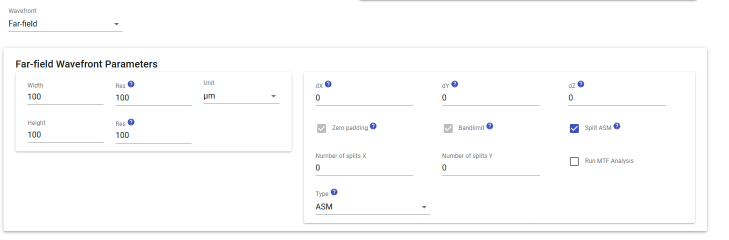
It is now possible to run Far-field wavefront analysis with split ASM. Select "Split ASM" in Far-field Wavefront Parameters and specify the number of splits for each axis.
The recommended number of splits is max(component width, ffwf width)/metacell width/10000. The last parameter is the current limit in our cloud version. We do not enforce limits on standalone versions, as the performance depends on your machine.
Setting Split ASM option is required for very large metacomponents.
PlanOpSim downloads in one place
[Downloads]
All PlanOpSim downloads are now listed in one place on the Downloads page (the button next to the Wiki button).
On-premises (aka local, aka standalone) users must now register for access to PlanOpSim's cloud portal, from which they can access the Downloads page and download new versions of the installer.
Two-factor authentication
[My Account]
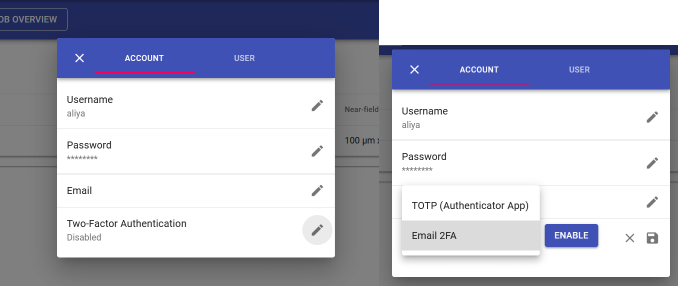
It is now possible to turn on the two-factor authentication in the account settings.
Click on account -> edit Two-Factor Authentication -> select either email or authenticator app -> enable. You will then need to confirm it via your selected method.
Now each time after you log in, you will need to enter your verification code to access your account.
Note: For on-premises (aka local, aka standalone) users, only TOTP (Time-based One-Time Password) authentication can work, because it is not possible to request an email locally.
Bug fixes:
- Fixed saving changes in metacomponent when updating from ideal family to real family
- Fixed editing meta component width
- Fixed meta component export with design map
- PDK metacomponent analysis now allows selecting polarization instead of limiting to TE
- Fixed upside down image upload within metacell structure
- Fixed phase only component design
- Fixed default rotation angle for back compatibility cross structures
- Using formulas in Jones polarization in simulations and analysis
- Improved performance of dependent formulas in metacell simulation settings
- Near-field wavefront creation performance in design targets for standalone users
- Near-field wavefront interactive mode is fixed
- Fixed extinction coefficient display for metacell group simulations
- Complex combination layers in metacell: fixed editing combination structures
- Fixed cross-section wavefront display in Analysis